Bingo - Offline Bingo Game PC
SNG Games
Download Bingo - Offline Bingo Game on PC With GameLoop Emulator
Bingo - Offline Bingo Game sa PC
Ang Bingo - Offline Bingo Game, na nagmumula sa developer na SNG Games, ay tumatakbo sa Android systerm sa nakaraan.
Ngayon, maaari mong laruin ang Bingo - Offline Bingo Game sa PC gamit ang GameLoop nang maayos.
I-download ito sa GameLoop library o mga resulta ng paghahanap. Hindi na tumitingin sa baterya o nakakadismaya na mga tawag sa maling oras.
I-enjoy lang ang Bingo - Offline Bingo Game PC sa malaking screen nang libre!
Bingo - Offline Bingo Game Panimula
Bingo – Offline Bingo Game brings the thrill of the bingo hall right to your phone. Experience the timeless fun of classic bingo anytime, anywhere. Whether you’re a fan of 75-ball Bingo with its fast pace or the traditional charm of 90-ball Bingo, this game gives you endless excitement — and you don’t even need Wi-Fi to play!
Play Bingo Offline or Online
No internet? No problem. Enjoy full offline Bingo games wherever you are: at home, on the road, commuting, or traveling. Your favorite free Bingo game is always ready in your pocket. When you’re online, step into exciting bingo rooms and compete with others for even more fun.
Classic Casino-Style Bingo Experience
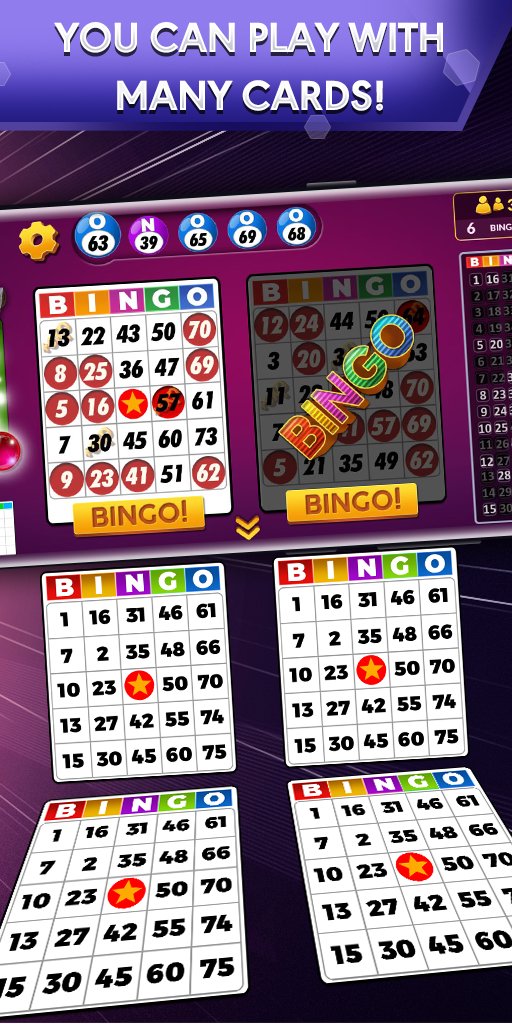
Feel the atmosphere of a real Bingo casino as you daub numbers, chase patterns, and shout Bingo! whenever you hit the jackpot. Spin the lucky wheel every day to collect bonus chips and keep your bankroll full. You’ll never run out of chips — the fun never stops.
Beautiful Designs & Smooth Gameplay
Enjoy colorful, beautifully designed bingo cards and easy-to-use controls. The game is designed for both casual players who just want to relax and dedicated Bingo fans who love nonstop action. With fast-paced gameplay, realistic sounds, and smooth animations, this game captures the authentic Bingo hall experience.
⭐ Features of Bingo – Offline Bingo Game
🎱 Two popular modes: play engaging 75-ball and 90-ball Bingo
🌍 Offline play: enjoy Bingo anytime, no Wi-Fi or internet required
🎁 Daily rewards: spin the lucky wheel, earn chips, and unlock new games
🎨 Colorful cards: beautifully designed Bingo cards with clear numbers
⚡ Fast and fun gameplay: smooth daubing and quick rounds
🏆 Optional online rooms: connect to compete with real players when you want
🚫 No banner ads: a clean and focused Bingo experience
Why Play Bingo – Offline Bingo Game?
Free to play: download once, play forever with free chips and bonuses
No Wi-Fi needed: perfect for travel, offline fun, or relaxing at home
Classic Bingo rules: enjoy authentic gameplay, just like real Bingo halls
For all ages: easy to learn, fun for casual players and Bingo fans alike
Always rewarding: daily bonuses and unlimited chips mean the fun never ends
Play Anywhere, Anytime
On a plane, on vacation, or relaxing at home — your offline Bingo adventure is always one tap away. This game is designed for true Bingo lovers who want the best mix of fun, relaxation, and nonstop excitement.
Join thousands of players who are already enjoying the best offline Bingo game on mobile. Don’t miss out on the thrill of daubing, pattern hunting, and shouting Bingo!
👉 Download Bingo – Offline Bingo Game now and start playing today. Whether you prefer offline Bingo without Wi-Fi or connecting online with others, the next Bingo round is always waiting for you!
Preview

Tags
CasinoBingoCasualMultiplayerCompetitive multiplayerSingle playerAbstractOfflineInformation
Developer
SNG Games
Latest Version
2.19.0
Last Updated
2026-09-28
Category
Board
Show More
How to play Bingo - Offline Bingo Game with GameLoop on PC
1. Download GameLoop from the official website, then run the exe file to install GameLoop
2. Open GameLoop and search for “Bingo - Offline Bingo Game” , find Bingo - Offline Bingo Game in the search results and click “Install”
3. Enjoy playing Bingo - Offline Bingo Game on GameLoop
Minimum requirements
OS
Windows 8.1 64-bit or Windows 10 64-bit
GPU
GTX 1050
CPU
i3-8300
Memory
8GB RAM
Storage
1GB available space
Recommended requirements
OS
Windows 8.1 64-bit or Windows 10 64-bit
GPU
GTX 1050
CPU
i3-9320
Memory
16GB RAM
Storage
1GB available space